


Restaurant profit optimization

SpotOn POS — Deep Dive Review

Restaurant POS with online ordering, reservations & waitlist tools, handhelds, KDS, and 24/7 support—built to streamline FOH↔BOH and guest flow.

Quick Summary

TL;DR

The 30-second version for busy operators

Verdict: Strong option for restaurants wanting a unified POS with first-party online ordering and built-in reservations/waitlist.

Shines at: Two-way guest comms, handheld workflows, KDS, and marketing tools tied to ordering.

Know Before You Sign

Payments run through SpotOn; pricing is quote-based—optimize total cost, not a single line item.

We're partners. If you click our SpotOn link, we may earn a referral. We still call it straight for operators.

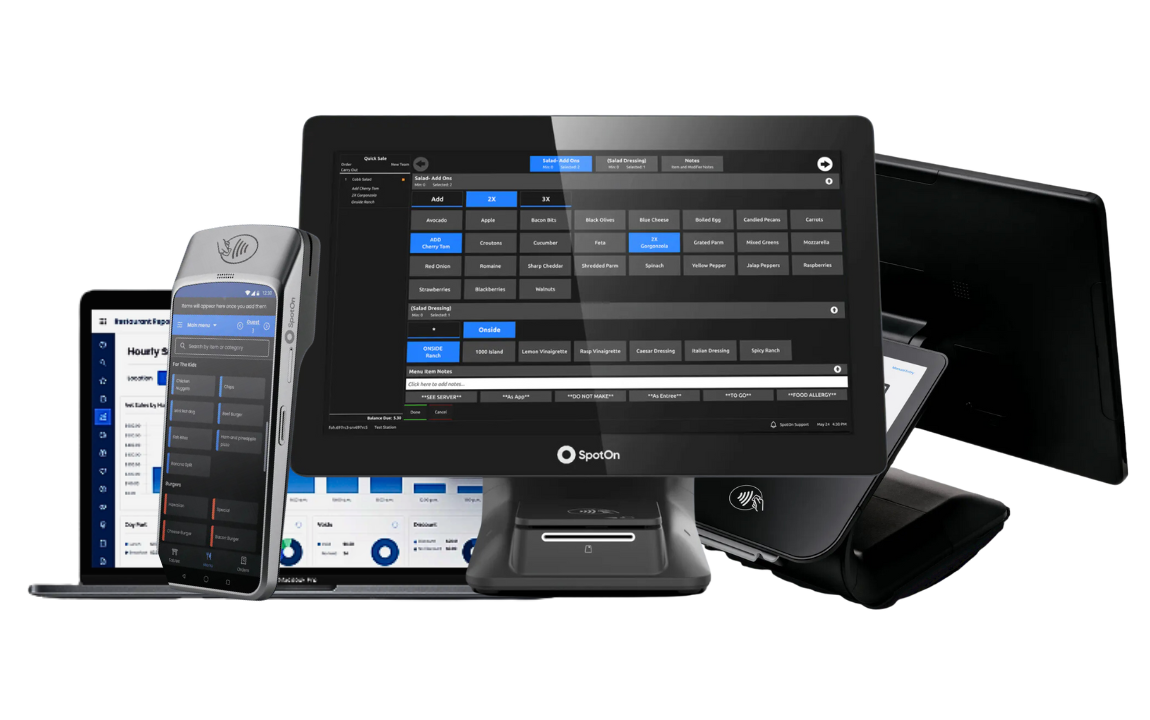
SpotOn POS Countertop & Handheld Powered by SpotOn

Platform Overview

What SpotOn Does & Who It's For

Core Features

Unified Stack

  • POS & KDS: Kitchen display, expo, coursing, order routing, handhelds.
  • Digital Storefront: First-party online ordering; delivery via DoorDash Drive options.
  • Guest Tools: Reservations & waitlist (SpotOn Reserve) with two-way texting.
  • Marketing: Email/text tools, loyalty, gift cards.
  • Ops: Menu management, reporting, multi-location management.

Feature availability depends on plan/add-ons. Confirm with sales.

Who It's For

Best Fit

  • Full-service and fast-casual operators who want integrated ordering and guest flow tools.
  • Teams that benefit from handhelds, KDS, and built-in marketing vs. bolt-ons.
  • Groups seeking one vendor for POS + ordering + reservations.

Investment

Pricing & Payments Reality

What to ask before you sign

Pricing Notes

  • Software: Tiered and quote-based; bundles vary by device count and modules.
  • Hardware: Terminals, handhelds, and KDS; mix for FOH/BOH layout.
  • Custom: Multi-unit pricing is negotiated—collect competing quotes.
Compare total cost of ownership: software + hardware + processing + add-ons + support.

Payments Reality

Get This In Writing

  • Processing through SpotOn Payments; rates are quote-based.
  • Request your effective rate and fee table in writing (by channel and card mix).
  • Review term length, renewal windows, and early-exit language before you sign.

Processing Fees

Card Processing Snapshot

Illustrative U.S. ranges only

Example Rates

  • Card-present: ~2.3%–3.5% + $0.10–$0.25 per transaction
  • Card-not-present: typically +0.25–0.75 percentage points vs card-present
  • Other fees: chargebacks, refunds, subscriptions/add-ons — ask for a full fee table

Request a formal quote from SpotOn for your actual pricing.

Hardware & Setup

Device Options & Ecosystem

Terminals & Handhelds

Hardware

  • Counter terminals, guest-facing displays, and handhelds for tableside.
  • Tap-to-pay flows and fast item/modifier entry.

Kitchen Display (KDS)

BOH Ready

  • Routing, expo views, item timers, fire/hold logic.
  • Designed for heat and volume in BOH.

Setup & Scale

Cloud-Based

  • Cloud back office; remote updates.
  • Multi-location reporting and menu governance.

Honest Take

Pros & Cons

✓ Pros

  • Unified ordering + reservations/waitlist with two-way texting.
  • Handhelds + KDS streamline FOH↔BOH handoffs.
  • Marketing tools tie back to guest data and orders.

✗ Cons

  • Quote-based pricing—requires apples-to-apples comparison.
  • Smaller third-party marketplace than some competitors.

Getting Started

Integrations & Migration Checklist

Integrations & Ecosystem

  • Delivery handoff via DoorDash Drive options; partner integrations vary.
  • Inventory, analytics, and workforce tools—confirm features/pricing per integration.

Switching to SpotOn: Checklist

Before You Sign

  • Export menu & modifiers; map required options and pricing.
  • Label printers/KDS routing diagram (by station).
  • Payments: confirm effective rate, funding timing, chargeback process.
  • Training plan: FOH, expo, kitchen; soft-open script for first week.

Options

Alternatives & Recommendations

Closest Alternatives

  • Toast: unified stack with first-party ordering and payroll options.
  • Lightspeed Restaurant: inventory-forward, bar-friendly workflows.
  • Clover: simpler SMB setup with an app marketplace.

What We Recommend

  • Shortlist 2–3 vendors, run a demo on your menu.
  • Get quotes apples-to-apples (devices, software, processor, add-ons).
  • Negotiate renewal, exit terms, and service credits before signing.

Common Questions

SpotOn POS FAQ

Does SpotOn include online ordering and delivery tools?

SpotOn supports first-party ordering and delivery via partners like DoorDash Drive. Confirm availability and fees for your market.

Is there a reservations/waitlist system?

Included

Yes—SpotOn Reserve offers reservations, waitlist, and two-way texting to manage guest flow.

How is pricing structured?

Software and processing are quote-based. Request your effective rate and itemized fee table in writing.

Is there a contract?

Verify Terms

Expect a term agreement. Verify renewal windows and any early-exit fees before you sign.